
Pivoting and Tunneling Fundamentals: Reaching What You Can't Route To
Updated July 28, 2026 · Written by PWNMI — see About.
Compromise one host on a network and you'll often find a second network behind it — internal services, other machines, an entire subnet your attack box has no route to and never will, because nothing on the internet-facing side knows it exists. Pivoting is using the host you already control as a relay to reach that second network anyway. Every tool in this space is solving some version of the same problem; the differences are in what they need on the target and what they cost you in terms of noise and setup.
The core idea: someone else's routing table
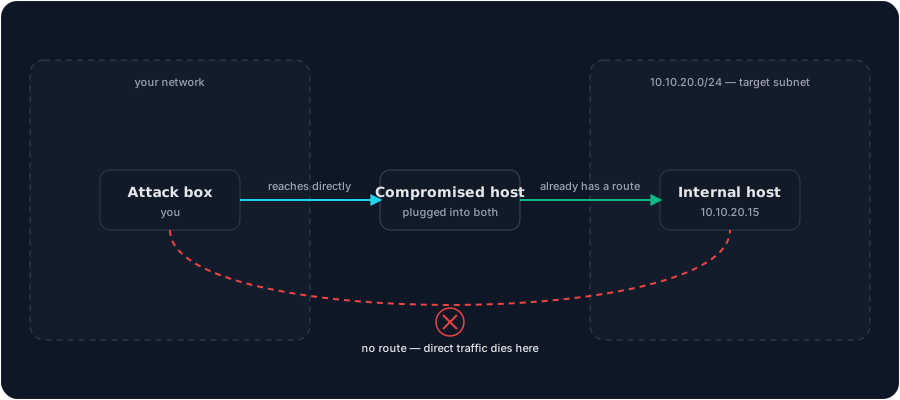
Your attack box can't reach 10.10.20.0/24 because it has no route there — no entry telling it which interface to send that traffic out of. The compromised host sitting on both networks does have that route, because it's actually plugged into both. Pivoting doesn't give your attack box a new route in the traditional sense; it uses the compromised host as a relay, so traffic that looks like it's going to the internal network is actually being forwarded by a machine that already has a legitimate path there.
SOCKS proxies: the concept behind most of this
A SOCKS proxy is a general-purpose relay — point any SOCKS-aware tool at one, and it forwards that tool's traffic through wherever the proxy actually sits. SSH can open one directly (ssh -D 1080 user@host), turning the compromised host into a SOCKS proxy your attack box can route arbitrary traffic through. This is usually the first thing to reach for: no extra binary to drop on the target, just a flag on a connection you're probably already making.
The catch: most tools don't natively speak SOCKS. nmap does with some caveats; most others don't at all. Proxychains solves that specific problem — it forces any command-line tool's traffic through a SOCKS proxy whether or not that tool was ever built with proxy support, which is what actually makes an SSH dynamic forward useful for your whole toolkit instead of just the handful of proxy-aware tools.
Port forwarding: three directions, one mechanism
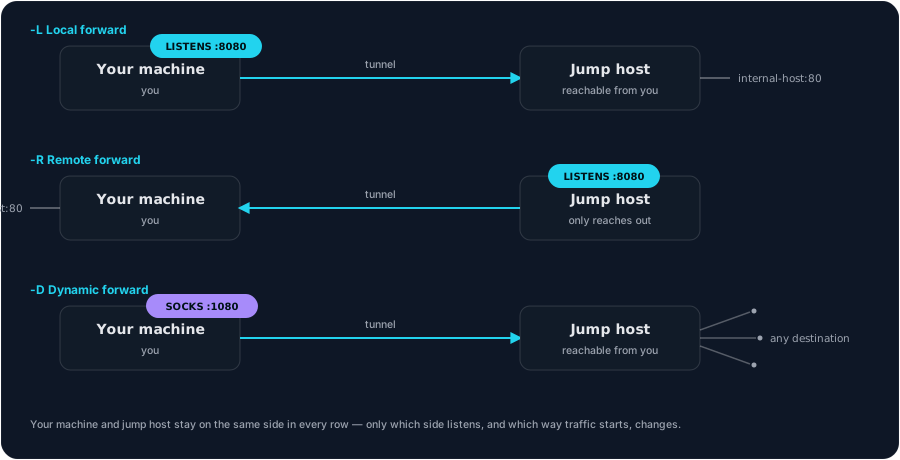
SSH forwarding covers three distinct needs, and mixing them up is the most common beginner confusion:
- Local forward (
ssh -L 8080:internal-host:80 user@jump-host) — a port on your machine that tunnels to something the remote side can reach. Use this to reach one specific internal service without setting up a full SOCKS proxy. - Remote forward (
ssh -R 8080:localhost:80 user@jump-host) — the reverse: a port on the remote machine that tunnels back to something on your side. Useful for exposing a listener on your attack box to a host that can only reach out, not receive inbound connections. - Dynamic forward (
ssh -D 1080 user@jump-host) — the SOCKS proxy case above; one flag, arbitrary destinations, instead of one tunnel per destination.
When SSH isn't available
Not every foothold has SSH installed or reachable. Chisel exists specifically for that gap — a single static binary, client and server, tunneling arbitrary TCP/UDP over HTTP instead of SSH's own protocol. It gives you the same local/remote/dynamic forwarding concepts, just over a transport that's far less likely to get blocked by egress filtering than an arbitrary port would be.
Socat covers a related but distinct need: a standalone relay between two endpoints, or upgrading a raw reverse shell into something that behaves like a real interactive terminal. It's not primarily a pivoting tool the way chisel is, but it shows up in the same conversations because "relay traffic through a host you control" is the same underlying pattern.
Picking the right tool
- Have SSH access already? Start there —
-Dfor a general SOCKS proxy,-L/-Rfor one specific service. No extra tooling required. - No SSH, need general access to an internal network? Chisel — drop the binary, tunnel over HTTP.
- Need to route an entire toolkit (not just one connection) through whatever proxy you've established? Proxychains, on top of whichever tunnel you built above.
- Need a raw point-to-point relay, or a shell that doesn't fall apart the moment you run
vim? Socat.
Common mistakes
- Forgetting
-Pnand-sTwhen scanning through a proxy. Host discovery and raw SYN scans don't work through a SOCKS proxy — proxychains can only forward full TCP connections, so scanning tools need to skip both. - Setting up a dynamic forward and then wondering why only some tools use it. A SOCKS proxy on its own only helps tools with native SOCKS support — everything else needs proxychains (or similar) forcing its traffic through.
- Not checking
/etc/proxychains4.confmatches your actual tunnel. Proxychains does nothing useful if its configured proxy address doesn't match the forward you actually set up.
Next step
For the specific command syntax behind everything here, see the Chisel, proxychains, socat, and SSH cheat sheets. For the reverse scenario — exposing a lab service outward rather than reaching inward — see domains and Cloudflare Tunnels.
Get new write-ups in your inbox
New roadmaps, tool walkthroughs, and lab write-ups. No spam. Unsubscribe anytime.